
Every Just Webhost it hosting package comes with a free wildcard SSL certificate, enabling you to use the more secure ‘HTTPS’ protocol to keep your site users secure. To activate the Cert, you’ll need to make sure you’ve pointed the domain name to our nameservers.
With that done, you need to:
- Within Manage Services, select Manage Hosting.
- Within Manage Hosting, select Manage on the hosting package on which you wish to activate the Cert
- Under Security, click on the SSL/TLS icon
- You will then see your domain name and an option to Activate Free SSL next to it – select this and the SSL will be applied to your domain
- If you’d like all your visitors to use secure connections (i.e. for HTTPS to always be used), simply select the Enable option at the bottom of the page
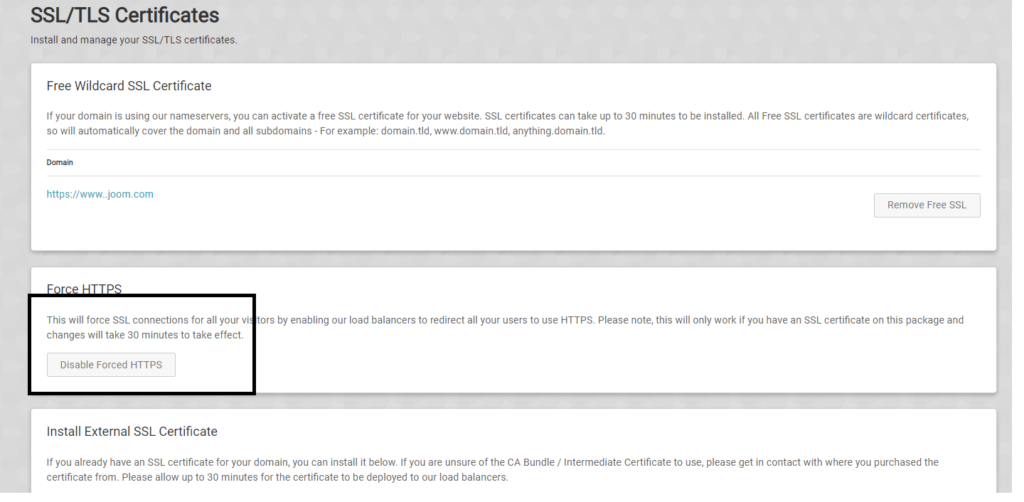
Once the Certificate has been activated, it will take up to 30 minutes to secure your website. This is due to the changes needed to be made on our load balancers.
Tip for uses using wordpress if there you are still no getting Secured pages install a plugin called “Really simple ssl” Found:
Why use ssl certificates?
The core function of an SSL certificate is to protect server-client communication. On installing SSL, every bit of information is encrypted. In layman’s terms, the data is mixed up and can only be read by the intened repiant and the server.
It also helps with seo (Search ranking optomisation) whitch you can read about:
In 2014, Google made changes to its algorithm in order to give the upper hand to HTTPS
To give a safer web browsing experience from 2018 onwards, all the popular web browsers used around the globe like Google Chrome & Firefox Mozilla will punish them by giving a warning message of ‘Not Secure’ on the URL bar. It could be possible that in near future website may even get blocked.
This was found in a case study here
Read more blogs: